Your design system, with a canvas and an agent.
Studio composes real @shavin/ui components on a live canvas. Drag them yourself or let your AI agent build the page, then export clean JSX.
Calm control of your money
Every account in one clear picture.
- components
- 91
- ready blocks
- 86
- MCP tools
- 30
- off-token values
- 0
Describe it. Watch it build.
Connect Claude, Cursor or any MCP client. The agent builds on your canvas through Shavin's tools, checked against your tokens, and you watch every move.
- compose_to_canvasplaces real blocks
- set_studio_themeretunes your theme
- validate_coderejects off-token code
Compose it. Theme it. Ship it.
Three moves, one canvas. Click through the preview; it behaves like the real thing.
Compose with real components
Everything on the canvas is an actual @shavin/ui primitive. Select, nest and rearrange it by hand, or let an agent do the first pass.
- Layers panel mirrors the component tree
- Inspector edits real props, not styles
- Stateful controls preview live
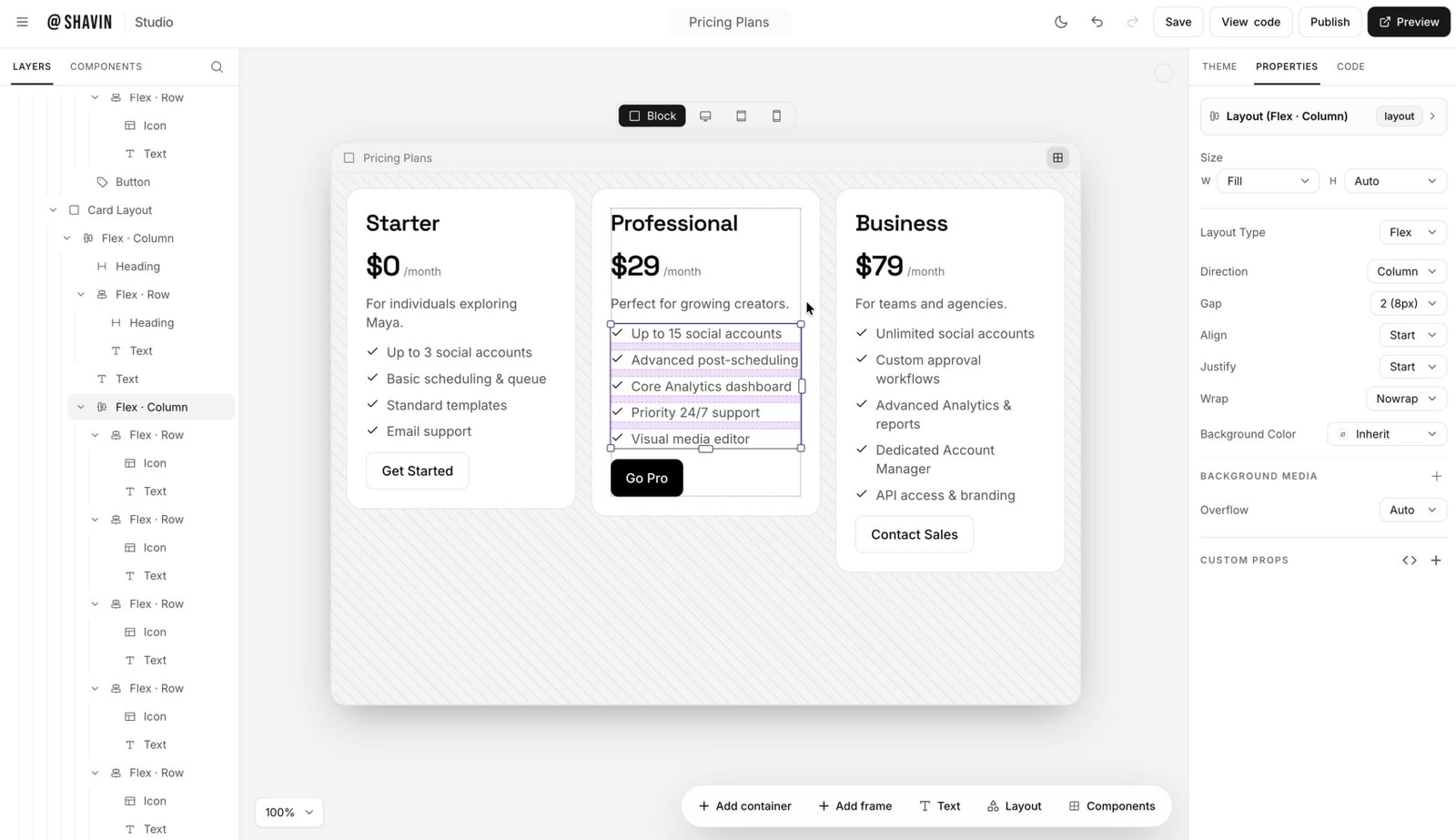
This is the real canvas.
Layers on the left, live blocks in the middle, the inspector on the right. Straight from the app, theme and all.
Swipe to explore
Before you join.
Be early to the canvas.
Studio opens in waves. Request early access and we will email you when your wave is ready.